
1. Domain registrar
name, registrant, account owner, recovery email, renewal method, transfer lock, expiry date, and the authorized path for receiving an Auth-Code.
Provider Rescue · Practical guide
The safest exit starts before the cancellation email. First recover authorized control, preserve evidence, identify what the current provider actually supplies, and build a destination that has been tested without disturbing the live business.
This guide is for a legitimate business owner or authorized operator planning a responsible exit—not for bypassing account security or taking assets the business does not own.
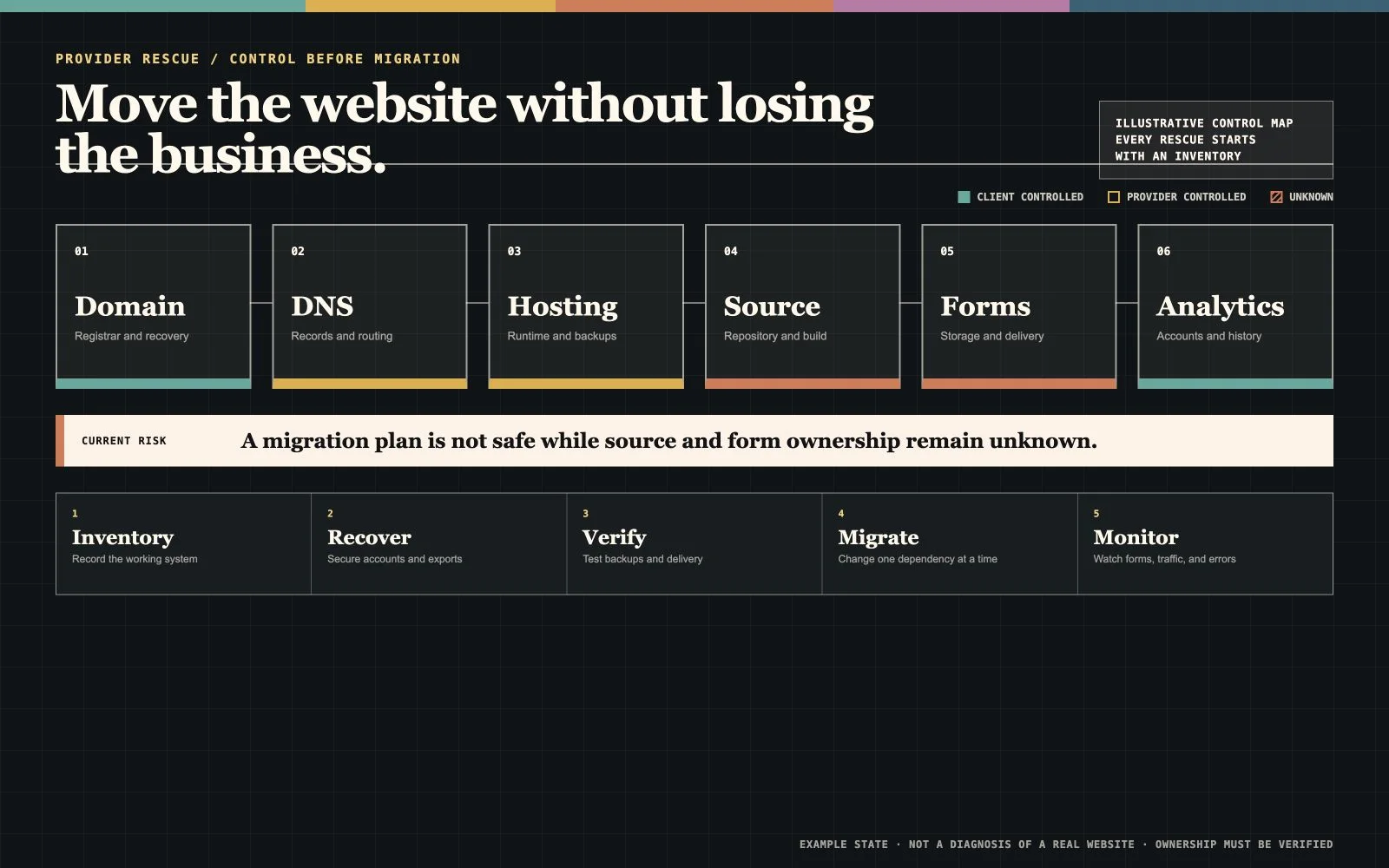
Provider Rescue control map
A responsible rescue maps control of the domain, DNS, hosting, source, forms, and analytics before anyone starts moving files or changing records.
Write the reason in one sentence: the provider is too expensive for the work delivered; access is withheld; the site is neglected; reports replace implementation; the ?PlatformA product or managed environment that provides reusable capabilities other websites, tools, or workflows can run on or connect to.Read the full definition↗ cannot support the business; communication has failed; or the company simply wants a different operating model. The reason determines what must be recovered, repaired, rebuilt, or terminated.
Review the current contract, invoices, renewal dates, cancellation terms, ownership language, licenses, and outstanding obligations. Technical control and legal ownership are related but not identical. Do not let a new provider guess what the agreement says.
?Domain registrarA company authorized to register domain names and maintain the registrant's account and renewal relationship.Read the full definition↗ name, registrant, account owner, recovery email, renewal method, transfer lock, expiry date, and the authorized path for receiving an Auth-Code.
Current name servers and a complete export or record of A, AAAA, CNAME, MX, TXT, CAA, and other records. ?DNSThe distributed naming system that directs a domain to website, email, verification, and other internet services.Read the full definition↗ may also control email and third-party verification.
Production account, billing owner, plan, platform, ?ServerA computer or program that receives requests and provides files, data, or actions to another computer called a client.Read the full definition↗ or project identifier, ?DeploymentThe controlled process that makes a selected version of source available in a hosting environment.Read the full definition↗ method, ?Website backupA recoverable copy of website source, content, data, configuration, and other state needed to restore service.Read the full definition↗ method, limits, and cancellation consequences.
Authorized administrator access, user list, recovery path, plugins, themes, licenses, ?IntegrationA maintained connection that lets separate systems exchange data, events, or actions.Read the full definition↗, scheduled jobs, and any provider-owned components that will not transfer.
?RepositoryA project container holding files, revision history, branches, and collaboration records.Read the full definition↗ or source export, ?DatabaseAn organized system for storing and retrieving structured information used by an application or workflow.Read the full definition↗ where applicable, configuration, build instructions, environment requirements, and a backup that another qualified operator can actually restore.
Current page copy, images, video, brand files, fonts, downloads, product or service data, and confirmation that the business may reuse them.
A crawl or inventory of ?IndexabilityA page's technical eligibility to be considered for a search index.Read the full definition↗ ?URLAn address that identifies a resource by scheme, host, path, and optional query or fragment information.Read the full definition↗, high-value ?Landing pageA page designed as the arrival point for a specific audience, campaign, query, offer, or next action.Read the full definition↗, downloads, ?Canonical URLThe preferred URL identified for a page when the same or closely related content can be reached through multiple URLs.Read the full definition↗ URLs, ?RedirectA response that tells a browser or crawler to request a resource at a different URL.Read the full definition↗, ?HTTP status codeA three-digit number in an HTTP response that describes the outcome of a request.Read the full definition↗, and any old domains still sending visitors.
Every form, booking, quote, payment, checkout, application, newsletter, phone, and chat path—plus where submissions go and how failure is detected.
?Google Search ConsoleGoogle's owner-facing service for monitoring and debugging how a verified website appears and performs in Google Search.Read the full definition↗, ?Google AnalyticsGoogle's event-based analytics product for measuring configured website or application activity and reporting it through an interface and APIs.Read the full definition↗, tag management, business profiles, ?Self-hostedSoftware operated on infrastructure controlled by the user or organization instead of only through a vendor-managed service.Read the full definition↗ ?AnalyticsThe collection and interpretation of defined data to answer questions about behavior, performance, and business decisions.Read the full definition↗, ?Call trackingMeasurement that connects phone calls to a source, page, campaign, or customer path under a defined configuration.Read the full definition↗, advertising accounts, configured events, and historical exports.
Mail provider, MX records, SPF, DKIM, DMARC, CRM, payment provider, scheduling, maps, reviews, feeds, ?APIA defined way for one program to request data or actions from another program.Read the full definition↗, ?AutomationA repeatable process performed by software according to defined triggers, inputs, rules, permissions, and review points.Read the full definition↗, and recovery contacts.
Contracts, invoices, renewal dates, support contacts, change history, incident notes, platform notices, and the approvals that establish authority to act.
Ask for the ?Domain nameA human-readable name used to reach internet services, controlled through registration and DNS rather than by the website files themselves.Read the full definition↗ transfer, administrator invitation, backup, content export, ?DNS recordA typed instruction in DNS that directs traffic or publishes information for a domain or hostname.Read the full definition↗ export, analytics access, or other specific item. 'Give me everything' is hard to verify and easy to misunderstand.
Use the business records, payment history, registrant information, contracts, government business records, platform correspondence, and approved contacts the provider's recovery process requests.
State the requested action, destination account or authorized recipient, any relevant deadline, and a practical way to confirm completion. Keep the tone factual and preserve every response.
If the business is the verified owner, use the registrar, host, ?CMSSoftware used to create, organize, edit, and publish website content without manually changing every delivered file.Read the full definition↗, analytics, or platform provider's official recovery or ownership-transfer process. Do not attempt to work around ?AuthenticationThe process of verifying that a person, service, or device is the identity it claims to be.Read the full definition↗.
Do not cancel hosting, remove billing, change nameservers, or revoke the current operator until the destination, backup, email dependencies, and rollback plan are understood.
A technical provider can inventory, recover through authorized processes, rebuild available assets, migrate, and verify. A disputed contract, ownership claim, or demand for damages belongs with qualified legal counsel.
Prepare the replacement away from production. Confirm responsive behavior, accessibility, content, images, ?MetadataStructured information describing a page or resource, including titles, descriptions, canonical references, and social-sharing fields.Read the full definition↗, internal navigation, contact information, privacy and legal pages, ?Web formAn interface that lets a visitor submit structured information or request an action.Read the full definition↗, confirmations, analytics, integrations, and the ability to deploy or roll back. Test the real business actions, not only the homepage.
If the old provider owns a proprietary theme, plugin, builder license, hosted form, stock-photo license, or code component, decide whether to purchase a client-owned replacement, rebuild that function, or remove it. A screenshot of the old website is not a complete or automatically reusable website.
Combine a site crawl with ?XML sitemapA machine-readable list of canonical URLs a site wants eligible crawlers to discover.Read the full definition↗, analytics, Search Console, ?BacklinkA link from a page on another website to a page on the business's website.Read the full definition↗, and business-record evidence where available. Do not assume the visible navigation contains every useful URL.
When a valuable page can retain its current path and purpose, changing it creates unnecessary migration work. A new design does not require a new URL for every page.
Send each removed or changed URL to the most relevant replacement. Use server-side permanent redirects for permanent moves and avoid ?Redirect chainA sequence in which one URL redirects to another URL that redirects again before the final response.Read the full definition↗ or a blanket redirect to the homepage.
Update ?Internal linkA link from one page on a website to another page on the same website.Read the full definition↗, canonicals, metadata, ?Structured dataMachine-readable fields that describe visible entities and content using an agreed vocabulary and supported format.Read the full definition↗, hreflang where applicable, and the XML sitemap so the destination describes its own current URLs.
Make sure the authorized business retains access to the relevant Search Console properties, submit the current sitemap, and use the Change of Address tool when Google's documented conditions for a domain move apply.
Check important URLs, indexation signals, crawl errors, redirects, impressions, clicks, forms, analytics, logs, and customer reports. Keep redirects for at least a year when practical and longer when old links still matter.
Record the final pre-launch configuration and backup. Confirm the person approving the change, the ?CutoverThe controlled point when users, traffic, or operations move from the previous system to the replacement.Read the full definition↗ window, the ?RollbackA controlled way to restore a known prior state after a release causes unacceptable problems.Read the full definition↗ trigger, the previous working state, and who is watching forms, email, analytics, errors, and customer-facing routes after the change.
Avoid changing the domain, DNS provider, ?HostingThe service and infrastructure that make website files or application responses available to internet visitors.Read the full definition↗ platform, ?Website architectureThe organized relationship among a website's pages, URLs, navigation, internal links, templates, and content types.Read the full definition↗, every URL, all content, business email, analytics, and customer systems simultaneously unless there is no safer route. Google's migration guidance recommends changing one major thing at a time when possible because fewer simultaneous variables are easier to diagnose.
The business controls the agreed domain, production account, analytics, ?Search propertyA verified website or URL scope represented as a managed property in a search-platform account.Read the full definition↗, source or deployable export, content, integrations, billing, and recovery contacts.
The handoff names providers, accounts, dependencies, renewals, backups, deployment process, form destinations, analytics setup, licenses, limitations, and recovery paths.
The launch record states which routes, redirects, forms, inboxes, integrations, ?EventA defined action or occurrence recorded by an analytics system with approved contextual properties.Read the full definition↗, devices, and ownership transfers were checked—and what remains unresolved.
The business knows what it can move, how to export it, which third-party costs continue, what support is separate, and what another qualified operator would need next time.
Send the current website, the provider situation, and the access you know you have. Boho's free review identifies the visible risks and the missing facts. Paid Provider Rescue starts only after the smallest responsible scope is clear.
Primary references
These references support the platform, ownership, and migration guidance above. Your contract and account records control your specific situation.